
ECU Setup
Gear calculation setup
Calibrate gear detection from the ratio of engine speed to vehicle speed.
Gear Calculation from Gear Ratio
The ECU calculates the selected gear by comparing the live gear ratio with the calibrated high and low thresholds. The ratio is calculated as:
Current Gear Ratio = Engine Speed / Vehicle Speed
Drive the vehicle in every gear at a steady speed, for example 20 km/h, and record the Current Gear Ratio shown in SXTune for each gear.
Example measured ratios
| Gear | Current Gear Ratio |
|---|---|
| 1st | 125 |
| 2nd | 75 |
| 3rd | 54 |
| 4th | 46 |
| 5th | 40 |
| 6th | 28 |
| 7th | 15 |
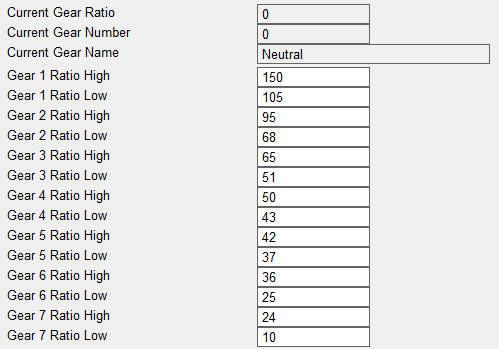
Set the High and Low thresholds
For each gear, enter a High value that is higher than the maximum ratio recorded for that gear and a Low value that is lower than the minimum ratio recorded.
Using the supplied example, first gear has a measured ratio of 125. With Gear 1 Ratio High = 150 and Gear 1 Ratio Low = 105, first gear is detected whenever the Current Gear Ratio lies between 105 and 150.
Example threshold values
| Gear | High | Low |
|---|---|---|
| 1st | 150 | 105 |
| 2nd | 95 | 68 |
| 3rd | 65 | 51 |
| 4th | 50 | 43 |
| 5th | 42 | 37 |
| 6th | 36 | 25 |
| 7th | 24 | 10 |
These are example values only; measure the actual vehicle and set thresholds around the ratios it produces.
Validation
After all High and Low values have been entered, drive the vehicle again and check that every gear is successfully and consistently detected.
If gear detection is not reliable, first confirm that Vehicle Speed is correct, then re-check the measured ratio range for the affected gear and adjust its High/Low thresholds around the observed values.