
On this page
CONNECTIONS
USB connections
Choose the correct USB role for SXTune, log downloads or GPS.
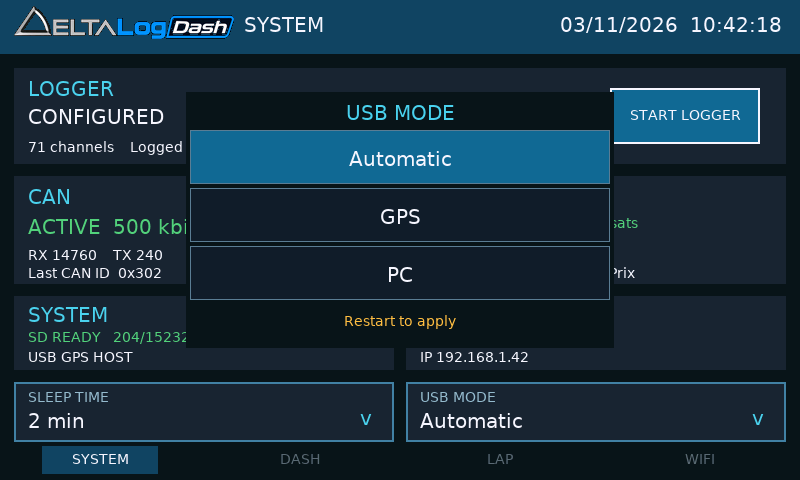
The Dash USB port has one role at a time. Select it in SYSTEM → USB MODE, then restart.
Choose a USB mode
| Mode | When to use it | What happens |
|---|---|---|
| PC | SXTune configuration or supported PC log transfer. | Dash operates as a USB serial device. Select its COM port on the PC. |
| GPS | A dedicated USB GPS receiver, including reconnection after boot. | Dash keeps the USB host active even if the receiver was absent at startup. |
| Automatic | Use GPS when already connected, otherwise allow a PC connection. | At boot the Dash briefly checks for a supported GPS. If found, it keeps host mode for that boot; otherwise it switches to PC mode. Connect GPS before power-up. |
Connect SXTune
- Stop logging and wait for it to finish. Open SYSTEM → USB MODE → PC.
- Restart the Dash and connect it to the PC with a data-capable USB cable, using the PC connection arrangement supplied for the unit.
- Open SXTune and select the Dash COM port. Check that the software identifies the logger before sending configuration.
- Set channels, sampling rates, clock and session details as required, then send the logger configuration. Verify the channel count on SYSTEM.
- Before using GPS again, select GPS or Automatic, restart and reconnect the receiver as appropriate.
USB log downloads
Stop recording, leave the SD card inserted and use PC mode. Open the compatible PC software’s logger file-transfer function and choose the Dash COM connection. Retrieve the matching DTT/DTD pair, then open it in DeltaLog.
The Dash uses USB serial transfer. It does not expose the card as a Windows drive or MTP device. For ordinary file copying, remove the card after power-off and use a card reader.
If the PC cannot find the Dash
Check PC mode and the restart first. Try a known data cable and another PC port, then reselect the COM port. A GPS receiver connected to a host-mode port will not create a PC COM connection. See USB troubleshooting.