
On this page
USING THE DASH
GPS & lap timing
Acquire a fix, choose the correct layout and establish a predictive reference.
A connected GPS receiver, valid fix and correct timing line are the foundations of reliable lap timing.
Use a USB GPS receiver supplied or approved for DeltaLog Dash.
Connect and acquire a fix
- Connect the supported USB GPS receiver. Use GPS mode for a dedicated receiver, or connect it before boot in Automatic mode.
- Open SYSTEM or LAP. Check connection, incoming data and fix separately.
- Place the receiver with a clear view of the sky and wait for a valid fix. Check the displayed update rate and satellites if diagnosing reception.
| Message | What it means |
|---|---|
| GPS NOT CONNECTED | The receiver is not connected/enumerated. Check USB mode, cable and receiver. |
| WAITING FOR GPS DATA | A receiver connection does not yet provide usable position data. |
| WAITING FOR GPS FIX | Data is arriving but there is no valid position fix yet. |
| START LINE NOT SET | There is no usable timing marker in the current configuration. |
| NO REFERENCE | A usable complete reference lap is not yet available. |
Choose the circuit layout
- With automatic track selection enabled in the PC logger configuration, allow the Dash to identify the nearby circuit.
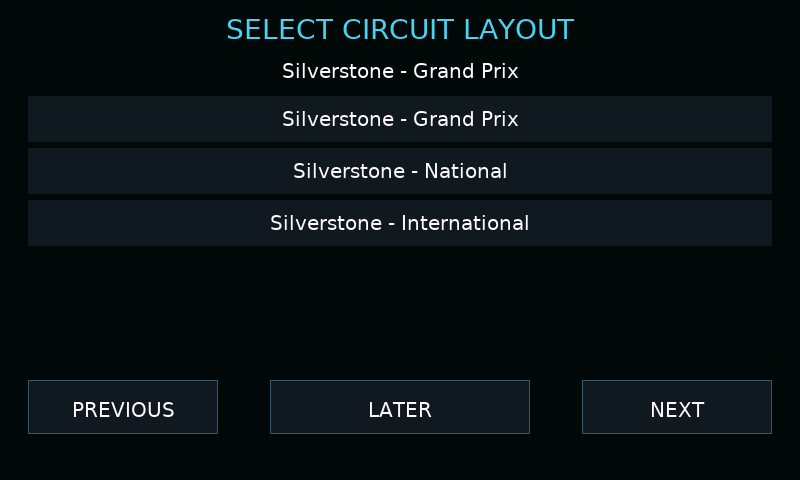
- At a venue with several layouts, use CHANGE LAYOUT while stationary. Use PREVIOUS / NEXT and select the layout that matches the event.
- Choose the correct timing line if a further choice appears. A saved selection is remembered for that venue.
- If automatic selection is disabled or the venue is not recognised, check the manual/fallback start and finish coordinates in the PC logger configuration.
Start the first lap
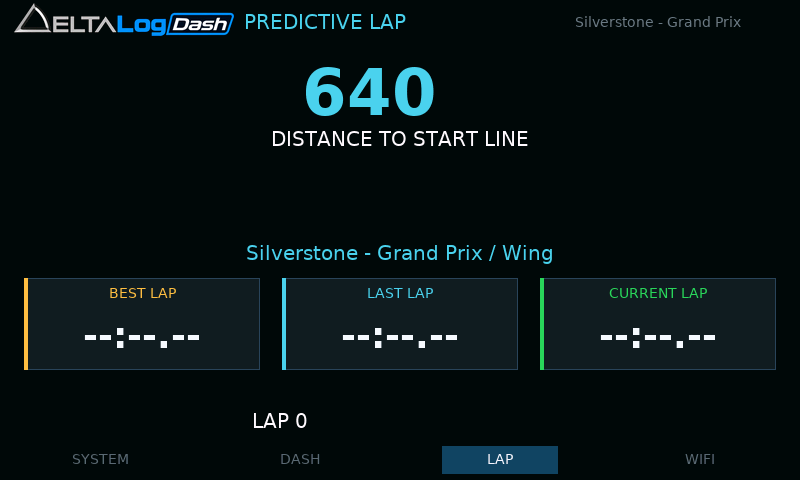
Before the first crossing, the large value is distance to the start line, shown in metres below 1 km and kilometres further away. The first crossing starts a timed lap; the approach to the line is not a complete reference lap.
Complete a valid lap on the confirmed layout to establish a reference. Lap timing can run without recording a log.
Read the predictive delta
| Display | Meaning |
|---|---|
| Green, negative / AHEAD | Your current lap is ahead of the reference at the corresponding route position. |
| Red, positive / BEHIND | Your current lap is behind the reference. |
| BEST LAP | Best completed lap time in the current timing session. |
| LAST LAP | Most recent completed lap. |
| CURRENT LAP | Elapsed time on the lap underway. |
| Progress bar | Progress along the reference distance. |

If prediction disappears
A GPS interruption, a long stop or a large position jump can discard a partial lap. Confirm the layout and timing line, restore a fix and complete a new clean lap. Do not use a provisional or incomplete lap as evidence that prediction is ready.